Video essay · July 11, 2026 · 32 min
Voice Is Vernacular
The machine learned our tongue before most of us learned its. Voice is now a first-class interface for people, computers, and the agents we build relationships with.
The thesis
The machine learned our tongue
For centuries, Latin separated the institution from the people. Early computing repeated the pattern: semicolons, syntax, and exact commands formed a priestly language that humans had to learn before machines would listen. Graphical interfaces softened the gate without removing it.
AI changes the direction of translation. Computers can now accept the language people already use—and voice is the original form of that language. “Voice” also means perspective: the distinct point of view carried by a person or, increasingly, by an agent.
A conceptual progression from the talk, not a claim that each interface replaces the others.
Voice between people
Voice notes are inefficient on purpose
Text is compact, searchable, and easy to scan. Voice carries timing, hesitation, warmth, emphasis, and the feeling that another human is present. That extra humanity is also what makes a voice note slower and more interruptive than a message.
The medium should follow the job: text for efficient information transfer; voice when intonation and connection are part of the information.
Voice with computers
Words in, words out
Large language models already operate on words and word fragments. Prompts, system instructions, skills, memory, and retrieved context all become tokens before a model responds. Dictation removes the keyboard bottleneck from the front of that process.
Good voice input feels close to the speed of thought. It tolerates pauses, lets a person speak more naturally than they type, and leaves the model to work from the words rather than vocal tone. The practical question is whether the tool adds enough latency or friction to break that flow.
The voice of an agent
A relationship needs durable state
An agent’s “voice” does not live in one model. It emerges from a system: personality, memory, skills, context, permissions, and the tools it can actually use. If those pieces belong to one vendor account, the relationship is rented. Portable files and explicit access boundaries make it durable.
This is the early rationale for two long-running agents: Liv for personal life and Max for work. Each develops a distinct judgment and working style while the underlying model can change. Privacy and control matter because continuity belongs to the human, not to whichever model is best this month.
The evaluation
A dictation tool should disappear into the thought
The live test compares four Mac options through one repeated passage. The point is not a synthetic accuracy score; it is the whole interaction from shortcut to visible words.
“The machine learned our tongue before most of us learned its. Voice is vernacular now. I don’t translate myself into the computer’s language anymore. It translates itself into mine.”
Live field test
Four tools, tested in the mess of real use
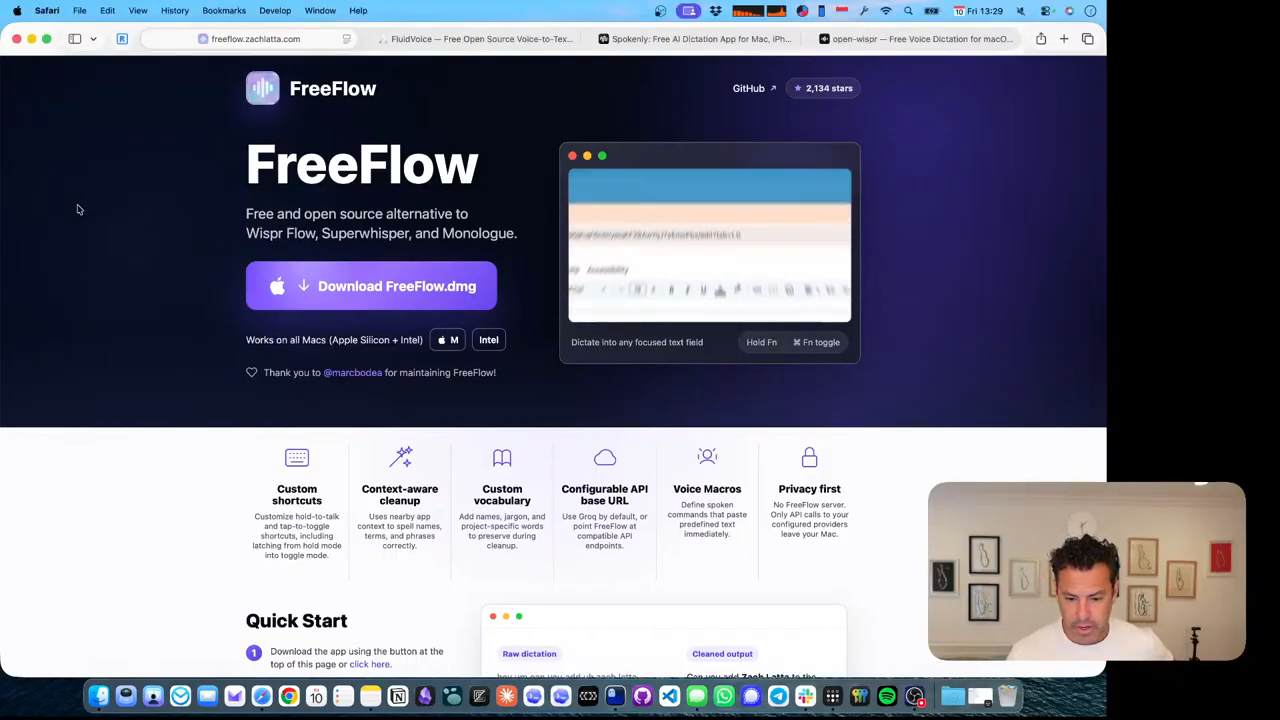
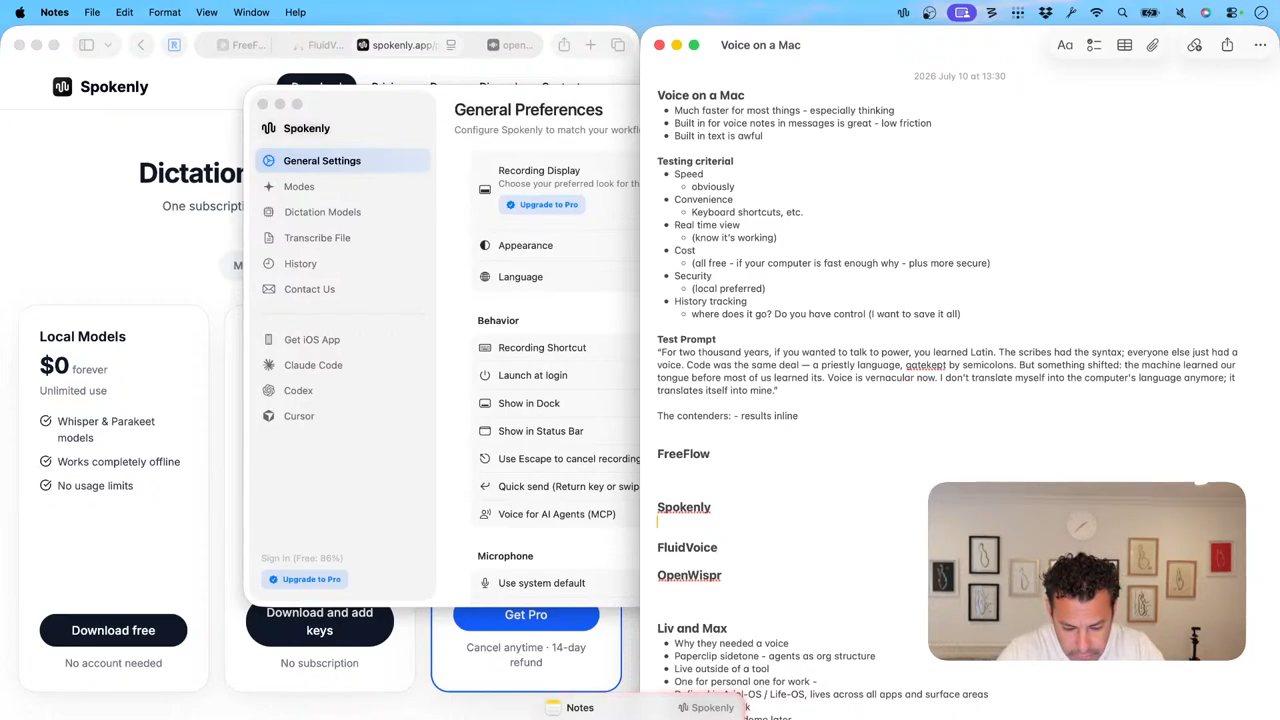
FreeFlow’s open-source pitch is attractive, but its shortcut failed in the live test and its OpenAI API path sends voice to the cloud. Spokenly successfully transcribed the common passage with a local-model option and a visible recording state. Apple Dictation was a useful baseline: improved, but not trusted for consistent daily use.
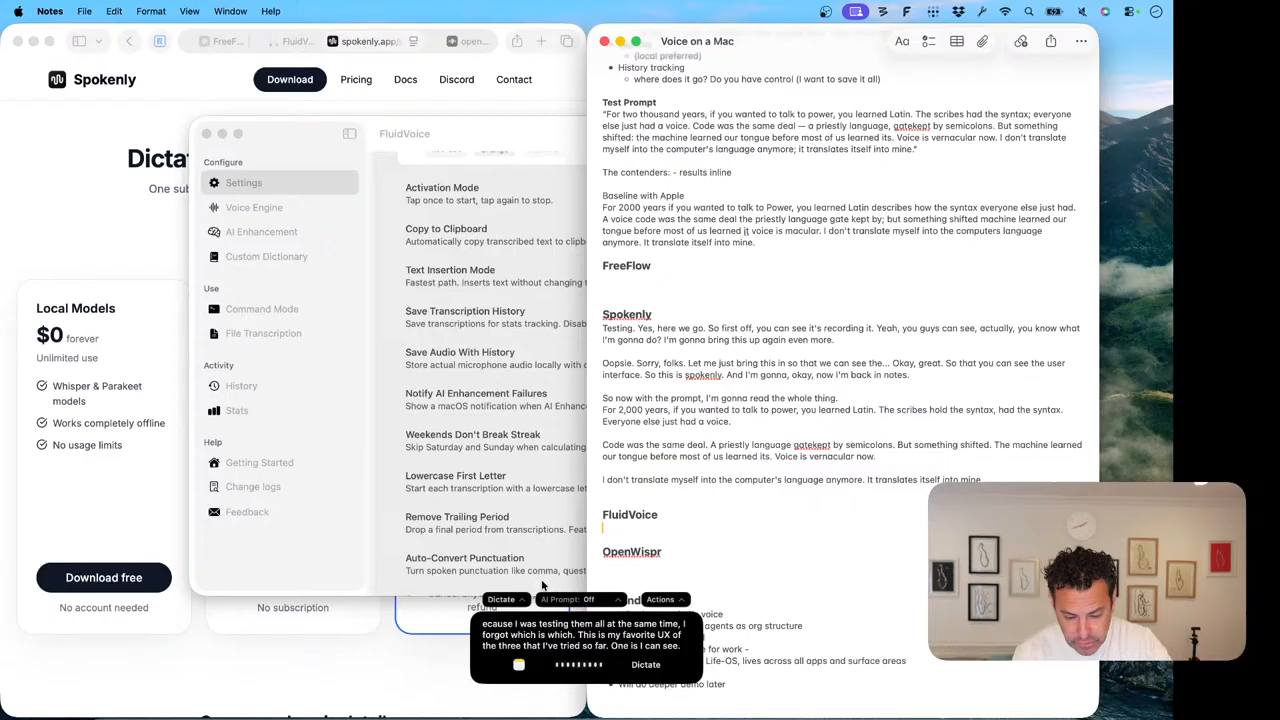
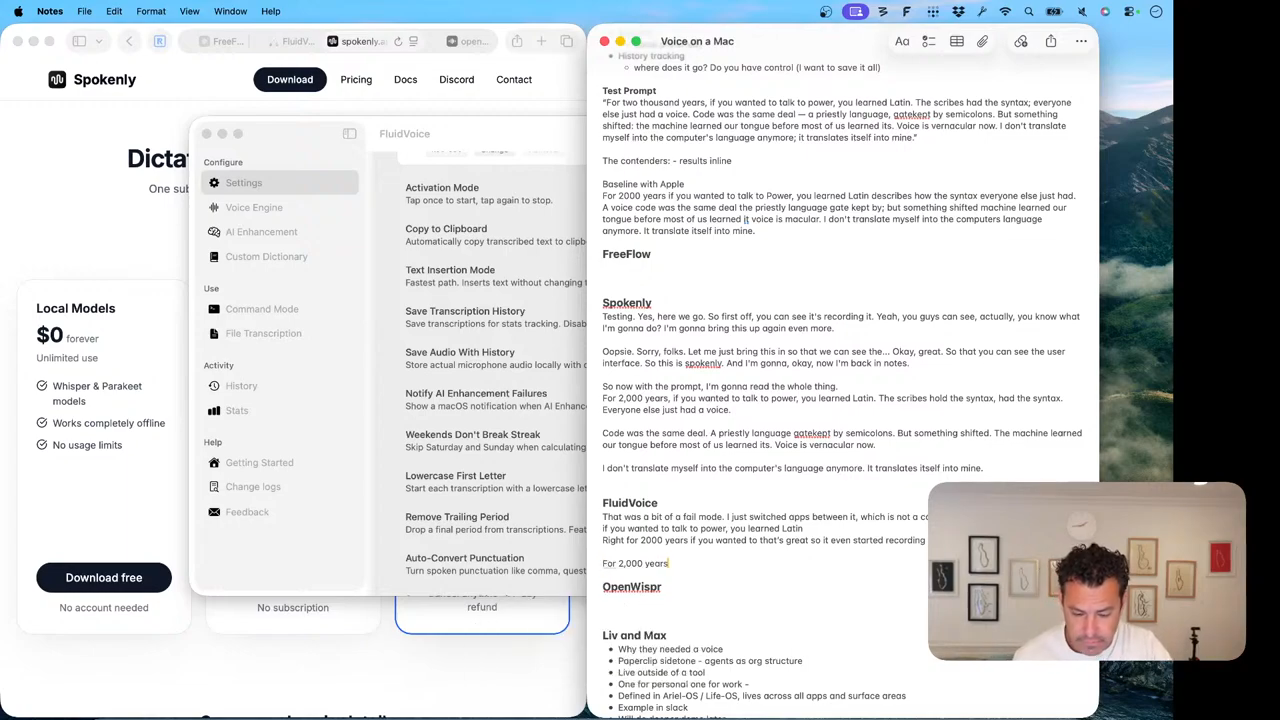
Fluid Voice combined a local NVIDIA Parakeet model with real-time text, app context, history, file transcription, and dictate/edit/command modes. Open Whisper remained the privacy-maximal command-line option, but without the visual feedback and settings surface wanted for everyday use.
The verdict
Fluid Voice wins because the interface stays visible
Fluid Voice was the fastest and most complete daily-use experience in this test. Local processing answers the privacy requirement; live text confirms that recording is working; history makes prior dictation recoverable; and mode controls point toward voice as more than a text entry shortcut.
The broader lesson is not that screens disappear. A voice-first computer still benefits from a visual interface that shows state, history, and control. Vernacular input and legible feedback are complements.
Watch the ideas
Key moments
The thesis · 0:47
The machine learned our language
“Computing has now evolved to treat voice as a first-class citizen.”
Human connection · 5:21
Voice notes are inefficient on purpose
“The point of the human voice note is to be more human.”
Agent identity · 11:51
Build durable relationships, not disposable chats
“They each are developing their own voice—not literally yet.”
The verdict · 31:17
Fluid Voice wins the field test
“Favorite speed, favorite features, favorite UX.”
Full record
Transcript
Generated from YouTube’s automatic English captions and lightly grouped into natural paragraphs; errors may remain. Setup chatter before 0:47 is omitted from the readable version. Download the raw VTT ↗
Read the full transcript
Voice becomes the vernacular
0:47 So today I want to talk about how voice is vernacular. So what is vernacular? Vernnacular is the language of the time. This could be visual language. It could be spoken language. In this case, the voice is literally the the language that we use in today's world. And to use an analogy before getting to today, for a long time, the official voice of the Roman Catholic Church was Latin. So for thousands of years, if you wanted to truly understand the word of God, you needed to speak Latin. That was the code of the era. and the vernacular was the spoken [clears throat] English or German or French over the years, but the code remained Latin. And this you could argue whether it was intentional or not, but essentially created a difference between the priests and the commoners. And there's a bit of analogy to that today.
1:44 Well, up until very recently where the code for computers, the lingua frana for computers was code, semicolons and syntax that was very sensitive to a misplaced comma or misplaced bracket and indentation and everything else. And that code was both necessary because computers were very very literal but also a gatekeeper. It prevented a lot of humans from being able to communicate effectively with computers. So we in order for to help humans communicate with computers, we created a whole bunch of metaphors. And some of that was syntax, maybe a little bit easier than coding and programming. uh like the original computers were terminalbased or uh you know the famous uh Windows prompt in 3.1 and before and that was okay but then we we improved it with the user interface with graphical user interface so humans could communicate with computers not only through code but through mice and clicking and dragging and that [clears throat] but that language today has has been superseded because today's computers primarily through AI can actually understand words outside of traditional programming language or outside of very technically defined terms and syntax in a particular interface or outside of a particular
Human voice and voice notes
3:16 button click. And the beauty of this is that voice is human. Voice is our natural communication language with each other. words, written words are actually derived from the spoken word. The natural thing, what babies speak first is spoken words. Mama, ma. The reason it's ma in every language is because that's the easiest sound to make. Ma, all you do is close your lips, put a little air behind it, and open it.
3:47 Papa or baba is close behind. And that's that's why where we get our name. And voice is [clears throat] not just this the spoken voice. It's also the perspective, a voice, a particular point of view. And if you combine all of these, right, [clears throat] the the human voice, the human perspective, and this vernacular, it's really fun to see that computing has now evolved to treat voice as a first class citizen. And that's what what I mean when I say voice is vernacular. So, a [clears throat] couple things now getting into the the more mechanics of it. How do we use voice to actually work with our computers? Uh because in in this primary day and age, it's a much more natural way to do that. So, first is one of the biggest things computers enable us to do is to communicate human to human more effectively. Now, we do this often times live with voice phone calls. Now, voice calls, but they used to be phone calls or video calls like FaceTime or other video calls. But we can also do it asynchronously. And historically, the primary asynchronous way for humans to communicate with other humans was textbased. Either emails or increasingly short messages uh short messages through uh SMS, iMessage, WhatsApp, you name it.
5:12 And the because the default was textbased short messages for a long time that was literally the expectation. And now, as of a few years ago, a lot of the messaging apps have introduced these voice notes, these short pushtore record voice notes. And it's interesting to see the trends among my friends because my technology ccentric male friends tend to hate these. They think it's inefficient, slow, it's distracting, it interrupts your workflow. And a lot of my non- techy friends love it. Uh some of this is culturally dependent. Uh some my good Argentinian friends said it's a lot of his Argentinian friends that's their default and they kind of speak into it.
5:54 And it's funny to see the the the the change because on one hand it is annoying. It is inefficient. It is distracting. But that's partly the point. The point of the human voice note is to be more human. And I find myself when I want to use it for intonation, for human effect, gravitating more and more towards voice notes. But when I want to use it for information effectiveness and efficient information communication, I'll default to text.
6:28 The interesting thing with that metaphor is that it's a little bit similar to how humans are increasingly communicating with computers.
Words in, words out
6:38 So the traditional way to communicate with a computer was through typing, right? Through through words. And that historically was typing words into a language that computer understood. Whether that was Python or Rails, didn't matter. It was about a syntax and a code to get a computer to understand. The abstracted version of that was a user interface and some graphical user interface that essentially just took commands down that were understood through this language of code and then rendered to a computer to do some action. Now increasingly that language is English or your spoken language of choice. That pros that we speak via prompts or questions or chat interfaces or others to AI increasingly is then taken into a whole series of processes.
7:30 But our our canonical process today is that there's words. We call them tokens which are either syllables or subsets of words and punctuation. But it's tokens which are primarily you know spoken or uh vernacular words pros on top of a uh becoming a payload sent to a particular model and then getting words out. Right? So these are these large language models. There's obviously slightly different for gen images, but the traditional kind of large language model is tokens in, words in to a model, words out. And those words can either be the users entered or the the end users entered prompt. They can be part of what's called the harness, which get gets all that into the to the code. It could be context, it could be skills, it could be a number of things.
8:23 that language is evolving all the time, but essentially it's words in, words out. The interesting part there is one of the most effective ways to get words in to a computer is voice. It's the speed of thought. It's something that you can say more naturally even when you pause. The transcription services are pretty forgiving. And it's usually, depending on what you're doing, faster than typing. And increasingly, the tools are amazing. So, one of the practical things that I want to get into now is how I've been using voice increasingly to interact with my computer. And so, I'm on a Mac. And today, the again the practical aspect of what we're going to do is walk through four that I've um four voice aspects that I've noted. Uh first, we're going to look at the actual technicals and implementation of just voice on a Mac. Uh a few demos. Uh partly is because I'm actually deciding which one I want to stick with. I have found four that I kind of like. So this will be both a real-time evaluation for myself. At the end of this, I'll pick one and also a hopefully durable and relevant asset for anybody else exploring this.
9:35 After looking at those four, I'm going to kind of zoom out and look at the the kind of quote voice of the agents uh that I work with. There's obviously a lot of discussion around what's the line between an agent and a skill and whose agent is it? Is it a third party's agent? Do you customize it? If you've customized an agent or an interface with a particular model, at what point is it yours versus let me raise the mic if uh let's see if that's any any better. I'm partly also testing up the setup, [clears throat] but back to it. So, it's it's essentially a uh you know, where does a particular agent live? What's what's where does this memory live? Is again is it in one of the big models? Is it a cloud thing? Is it a codeex thing? Is it a chatgpt thing? Where is it? Um when you customize something, where does that live? Now, some of these customizations and uh memories live in a particular repository or working folder. Some of them live in your user account with a particular model. And each of these settings and and memories and context essentially changes your relationship to that particular agent. Um, so this is that's going to be the second part of what what I'm I've been building out.
10:52 Um, you know [clears throat] what? We're
Durable agent voices
10:53 going to invert it. I think we'll get into the technicals later. So we'll stay with the philosophical and then get back to the technicals. So, um, philosophically, uh, one, no matter how much human intonation you speak into these dictation tools, at the end of the day, they just spit out words and the models don't understand, some do, but, most of the traditional models, LMS don't understand tone anyway. So, you're that would that's irrelevant. So, it's about getting the words in and out.
11:28 But in terms of the agent personality, so what I found myself doing is is exploring a lot trying to understand where the seams are between the models, the harnesses, the different labs themselves, what's saved on the repository versus the user. And I wanted to basically rebuild this from scratch. So my mental model now and I'll be adding more to this particular aspect later but is essentially thinking about building durable relationships with two highly customized agents for myself. And so I've built and introduced this into this uh operating system called LifeOS uh that I'll release open source. I'll be building out a little bit more of but essentially thinking about the AIS that I primarily interact with as one a chief of staff for my personal life. So this is Liv and Liv understands all my personal preferences, keeps me accountable, reminders, increasingly will have access to all of my personal things essentially mini EA uh will have the ability to interact on my behalf with within certain applications and that'll be my kind of my personal primary assistant. And the reason to build this outside of an individual player is because one, the models are changing very fast and I want to be able to understand, you know, the differences between them. Two, it's about privacy and control, which I think is going to be increasingly important in the age of AI. Uh, and three is because I want it to really be customized to me regardless of where that particular um agent is living. And again, an agent is really just a series of skills, memory, context, and access. And the access part is really important like what can a given agent do? What do they have access to? Uh so that's that's kind of one of one container. And the other container is Max which is the CEO of all the the work projects that I do. And Max has a different set of skills and and he's a coder. He's a very technical sophisticated uh CEO and he can get hands-on and he has access to the terminal and can install things. So very different set of personalities. But not only do they each have their own skills and memory and context, they each are developing their own voice, right? That not literally yet, although probably practically speaking later we'll we'll add that voice. And the idea there is that over time this becomes a durable, you know, increasing relationship. This is not a new concept. People are working at this and looking at it from a bunch of different aspects. And uh my perspective is more one the mental model I had was creating these two durable agents that I can actually build these ongoing relationships with and then two be able to understand exactly the line and the seams between which context and which skills are in which place what access exists to be able to do a particular task. So that's what I've been building out. I'll come back to some of that stuff later. Again, testing out this new streaming format to see how deep it goes. But the voice is vernacular metaphor. This will exist and we'll be you know continue to add to this one last thing about voice before getting into the literally voice actually I'll get into it in the voice on the Mac. So now transitioning
A practical Mac evaluation
14:39 practical how I actually work with the Mac with increasing amount of voice as a primary and preferred interface to get my words into the computer. Uh I've been testing out these four apps. I'm going to decide on one of them today. Okay, so as I'm deciding and finalizing which they are, I'll be kind of walking through them. But the irony of this whole thing is that Apple's voice interface sucks. Apple helped create the voice assistant with Siri. Yes, they acquired it, but they really popularized one of the f one of the first mainstream voice assistants. It's like 10 plus years ago and now it's the worst. It's just insane. Now, they announced that they're going to be powering this through through Google. Uh, so hopefully Gemini powered Siri is better uh in the fall. I'm holding my breath. I've not tried any of the betas. Um, but it is really embarrassing and to overuse a phrase, Steve would absolutely be rolling his graves and pulling a a robba on a whole bunch of Apple folks. Uh, metaphorically of course, but anyway, we are neither uh we are here today. So, now let's get into the flow. So, what I'm going to do is um I'm going to basically be going with a a live demo. I'm doing all the demo stuff on the on the MacBook screen, which is the the camera is a little bit worse, but I think that'll be easier in terms of uh seeing the full experience of it. So, let's switch to our MacBook screen. All right, everybody. All right, this is still working. Um, [clears throat] so
FreeFlow
16:20 the first one I want to try is free flow. I have already installed all these, so I'm not going to do the live install. These days, installing stuff is is pretty easy. So again, just three of them are just DMGs. One is a command line. I'll get back to that. So it's already installed, but and I've quit them all because they started conflicting on the keystrokes. So I'm going to go ahead and open FreeFlow.
16:44 And then while looking at this I have a let me bring in my note my test notes right. So all right so getting into the testing okay getting into the testing right everything is still visible here okay actually you know what I can make this a little bit bigger let's go full width here and then uh sorry about that is my thing okay here we go this is I'll keep on the left which one I'm testing so I know visually. Oh, that's a very annoying uh constant motion here. All right, let's just go.
17:34 Okay, let's make it a little smaller so it's not constantly distracting. It's okay. Uh, in terms of what I'm looking for, like how I'm evaluating these, there'll be a big ride later, too. But it's essentially speed that matters a lot. But I don't want to. The whole point of speaking to a computer is with a computer is that you're not restricted by by your typing speed. So speed is critical. And if it introduces a different latency or the slowness in getting the words, then it's it's just too annoying. So speed is critical. Uh convenience, right? The what are the keyboard shortcut options? Um you know, how do you you know think to use it? Uh the UX affordances. uh in terms of convenience. Uh the real-time view, that's another aspect of this real of of this kind of UX affordance and convenience. I personally like to see the words as they're being dictated.
18:22 It's both a reminder for uh the fact that it's working and also and kind of like a real-time debug, but also just a helpful thing like do I have to repeat something? Um security uh sorry cost. Uh you know there's a bunch of free tools out there. There's a bunch of compute locally, so prefer uh prefer free. The ones I'm looking at are free. There are paid models that are uh probably as good or better, but uh I'm going to focus on the free ones. And partly the reason is for security. I definitely would prefer all this voice to be local. Um I'll come back. going to do a deep dive on secure personal security in the age of AI, but uh I think Battlestar Galactica might not have been too far off that we're going to need to paper kind of air gap and and and go to paper for some really critical things. So, I'm defaulting to as much as I can being local and and and private first. Uh and for voice stuff, you know, why not? Especially when the tools are so good being being local. Um and then the other one partly of this UX uh affordance is the ability to track history. Again, if it's local, I think that's great. Uh I think there's a convenience to be able to show uh to show that. So, these are some of the criteria. I have a prompt that I'm going to read for all of them. And then, um and again, the UX should all appear right on the screen. Okay. So, first off, let's go ahead and launch FreeFlow first one. Okay. Pretty fast. Let's go through. And I have to re remember because I installed all of these and I forget which is which. Okay. So, this one has Okay, so this one does use your OpenAI API key. The diff different different ones use different different models. Um, some of them use free local models. This one does use an API key. That means that this is sending all of this out to OpenAI to the cloud. Also, not ideal.
20:21 prompts. Okay, fun. But I don't really care. I assume you figured out. Okay, voice macros. I also don't care. Run log. This is probably history. Okay, we won't get into the specific ones. Okay, [snorts] so and where is show menu bar in login? Oh, you can't see it because um I'm gonna just go ahead and quit uh my step menu. Okay, great. So, I simplified quite a bit with my eye stats removed.
21:08 Um so, here's how. Let me Okay, the whole shortcut is the globe icon. The toggle shortcut is the right option. Paste again. Microphone is using my nice mic. Okay, cool. So, it's running here. So, now let's go free flow. So, I'm going to put my cursor here. I'm going to hit the I'm going to hit the We're going to do the I like I prefer the single tap versus the press to hold. All right.
21:44 testing. Wait, is this working to I see the visual popup. Okay, so FreeFlow is running. Okay, automatic updates are on. There's no other app running. Write option. Hello. What is happening? It's frustrating. What happens if I just start dictating from here? Hello. Is this working? I swear I've used this before. Okay, what I'm going to do is we're going to make the total this to F5 just cuz I might have some conflicting things. See if that works.
22:57 Okay, here we go. Testing. Testing. Okay, we're going to go ahead and uh Okay, so I put right command and right. Okay, let's see if this works. Testing testing. Well, this is embarrassing. I don't know if it's more embarrassing for me or for free flow, but I'm going to go ahead and skip it. Plus, I don't really love the cloud thing anyway. Okay, so that's free flow.
Spokenly and Apple Dictation
23:52 All right, let's go to spokenly which is let's go to spoken. So spokenly's thing is here spokenly you know their big thing freeflow's big thing is free and open source alternative works. It's supposed to show that little thing talking but um okay I'll come back to that but I I still remember not not loving this. Okay, spokenly uh is the one that I'm pretty sure does does the Okay, so that's spokenly. They do have a cloud model, but local models are free. Uh we'll come back to that.
24:31 Okay, so now spokenly. Okay, testing, testing. See, somehow that was 68. Okay, so let's go to general settings. Yeah. So, they have a nice uh uh recording display is a pro upgrade to customize it. But I get there's at least this. Okay. And then the right command. Okay. So, now let's try this spokenly. Testing is this. Yes. Here we go. So, first off, you can see it's it's recording it. Yeah, you guys can see.
25:09 Actually, you know what I'm going to do? I'm going to bring this up again even more. Oopsie. There we go. Let me Sorry, folks. I'm going to just bring this in so that we can see the Okay, great. So that you can see the user interface. So this is spokenly and [clears throat] I'm going to Okay, now I'm back in notes. All right. So now with some prompt, I'm going to read the whole thing. For 2,000 years, if you wanted to talk to power, you learned Latin. The scribes hold the syntax, had the syntax. Everyone else just had a voice. Code was the same deal. A priestly language gatekept by semicolons. But something shifted. The machine learned our tongue before most of us learned its. Voice is vernacular now. I don't translate myself into the computer's language anymore. It translates itself into mine.
26:05 Okay. decently quick. Okay, testing. Okay, so it's recording. That was it. Um, now with the prompt. Okay, so this is the actual prompt. It's pretty good, right? Like the actual execution though is pretty good, right? And here's the thing. It adds I should do a You know what? I'm going to do a baseline with Apple just to show you how bad this is. So you just use the like the the the Apple thing which is um start dictation right for 2,000 years if you wanted to talk to power you learned Latin the scribes had the syntax everyone else just had a voice code was the same deal a priestly language gatekept by semicolons but something shifted machine learned our tongue before most of us learned its voice is vernacular now. I don't translate myself into the computer's language anymore. It translates itself into mine.
27:07 I mean, like, okay, it's, you know, it's added. Okay, it's gotten a little bit better with some punctuation and it's gotten a little faster. Um, definitely a little bit better, but again, in my experience, in terms of consistency, it has not uh delivered. Okay. So now fluid
Fluid Voice and Open Whisper
27:27 voice. So now let me quit spokenly. Okay. Settings again. So this one has um you know the usual uh so the voice engine. So, Fluid Voice has a local Nvidia parakeet model which I like, right? You can actually see like the overall accuracy of of that. Um, it does, you know, it automatically removes filler words. You can actually, some of these remove swear words if you do or don't like that. And, um, you can also, ah, I remember this. So, uh, Fluid Voice also does, uh, file transcription, which I don't think the other ones do. This is really convenient if you just want to like dump, uh, dump something in. There's obviously a million ways to do this and different apps and command line tools, but this is just a convenient way if it's something that you already have. Um, okay. And then let me just double check the settings here on the key on the shortcuts.
28:44 Uh, it's yeah, same thing. The right the right one. You can also have command mode. This is actually pretty cool if you want to do voice commands to interface with the computer. Uh that's the next step. I haven't yet gotten there. I'm pretty fast with like keyboard shortcuts and everything, but I'll I'll let you get there. Um this I have not tried either, which is very cool. Okay, so already this has things that some of the others don't have. And then yeah, escape. I think they all they all do that. Okay, cool. So, uh, so you can either do both or I like the toggle and then the transcript history. Okay. So, now if we go here for fluid voice and I tap this. Ah, that's right. Okay. So, first of all, because I was testing them all at the same time, I forgot which is which. This is my favorite UX of the three that I've tried so far. One is I can see it typing in real time. I can see what app it's in. I get the little things. I can change modes. I can see with a prompt. I can even take actions on it. Um, which is cool. And I can switch from dictate to edit to command mode. Pretty cool.
29:51 Again, I've always been in dictate mode. So, in terms of accuracy, let's go ahead and read the thing. For 2,000 years, if you wanted to talk to power, you learned Latin. The scribes had the syntax. Everyone else just had a voice. Code was the same deal. A priestly language gatekeep by semicolons. But something shifted. The machine learned our tongue before most of us learned its. voice is vernacular now. I don't translate myself into the computer's language anymore. It translates itself into mine.
30:19 Um, okay. Let's let's try that. Oh no. You know what? It uh Oh, what happened here? Oh, you know what? It didn't like me shifting applications real time. This work. It didn't work. Okay, let me try this again. That was a bit of a fail mode. I just switched apps between it, which is not a common thing. Okay. For 2,000 years, if you wanted to talk to power, you learned Latin. We won't have to. Okay, great.
31:17 So, this one's pretty fast, right? For 2,000 years, if you wanted to That's great. So, I even It even started recording before I before the UIX came up, right? We'll do another one super fast. So, if I like tap for 2,000 years, boom, that's fast. So, Fluid Voice, my favorite UX, favorite speed, favorite features, favorite UX. The other one, I'm not even going to give it a full run, but the other one I was going to try was Open Whisper. This one's if you're like truly a command line and and privacy junkie. Um, the problem with Open Whisper, the install's fine. It's just it's command line, but also and it's free forever and it's local, but the UX the UX sucks. There's no there's no app. There's no user interface, which as much as I'm saying we're moving to a voice first world. We I still like having that UX because it's a great way to actually view the history, toggle the settings, the little visual affordance.
32:20 So anyway, mission accomplished. I am settling on Fluid [snorts] Voice. Uh I'm going to uninstall and clean up the rest of everything else. Uh pretty excited for that and excited we'll be building out some more stuff around this voice is as vernacular content both in terms of stuff I'm building stuff I'm uh integrating and finding relevant for everything else. All right, enjoy.